Android can read an animated WebP, but it can't save one. Bitmap.compress writes still WebP images only, as WEBP_LOSSY or WEBP_LOSSLESS (see Android's docs), and there's no built-in way to turn several of them into an animation.
That matters if you need animated WebP, for example for WhatsApp stickers, which must be animated WebP files. The usual advice online is to use FFmpegKit, but FFmpegKit has been officially retired, and its repository was archived in July 2026.
When I built sticker support for GifDrop, I needed another way. It turns out the format is simple enough to write by hand, and you don't need to encode any images yourself. This article walks through how an animated WebP is built, one byte at a time, and ends with a short Kotlin example that writes one.
A WebP file is a list of chunks
A WebP file uses RIFF, a simple container format. It starts with a 12-byte header, followed by a list of chunks. Every chunk has the same shape:
| Part | Size | Meaning |
|---|---|---|
| Name | 4 bytes | Four letters, such as VP8X or ANMF |
| Size | 4 bytes | How many bytes of data follow, as a little-endian number |
| Data | That many bytes | What the chunk holds |
| Padding | 0 or 1 byte | Added when the data's size is odd, so every chunk has an even length |
A still image needs just one chunk with the picture in it: VP8 for lossy images or VP8L for lossless ones. An animated image adds a few more:
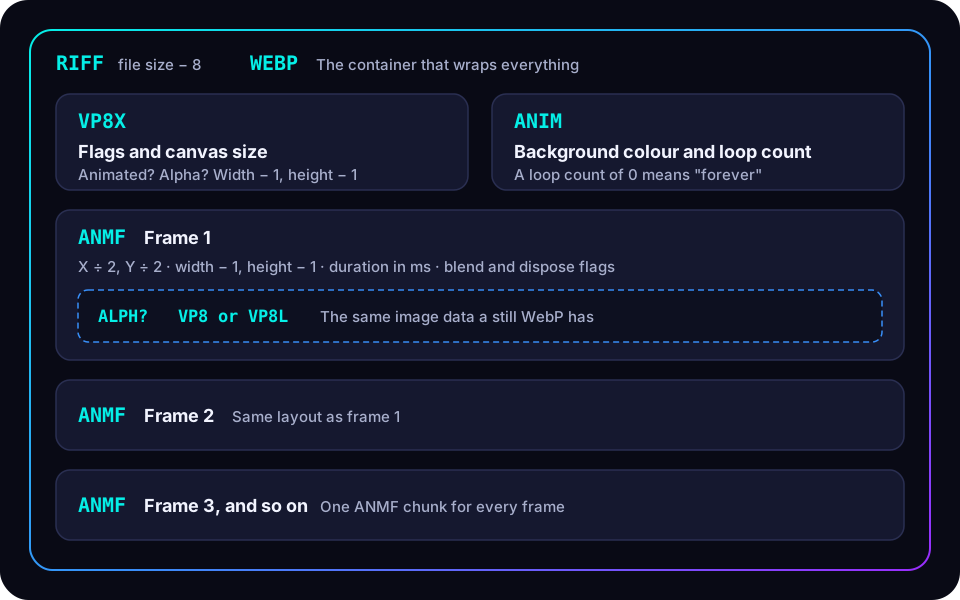
- VP8X says the file is animated, whether it has transparency, and the size of the canvas.
- ANIM holds the background colour and how many times the animation loops.
- ANMF holds one frame: where it goes, its size, how long it's shown, and the frame's picture.
The trick: each frame is a still image
Look inside an ANMF chunk and you'll find something useful. After a 16-byte header, it holds exactly the same image chunks a still WebP has.
So you don't need an animated WebP encoder. You can:
- Save each frame as an ordinary still WebP, which Android already does.
- Copy the image chunks out of each one.
- Wrap them in
ANMFchunks, and addVP8XandANIMat the start.
That's just moving bytes around. No image encoding code is needed.
Reading a real file, byte by byte
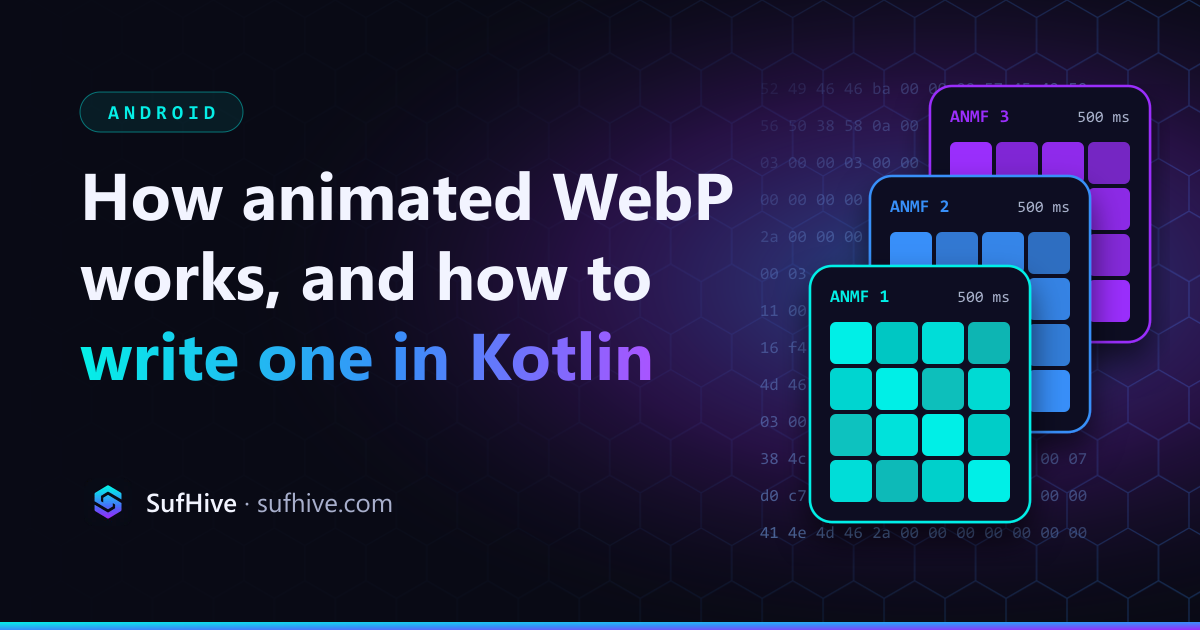
Here's a complete animated WebP. It's tiny on purpose: three frames, 4 × 4 pixels each, in cyan, blue and violet, shown for half a second each and looping forever. It was made by the Kotlin code later in this article, and the whole file is 194 bytes.

These are the first 94 bytes, which cover the headers and the first frame. Every number is little-endian, so the lowest byte comes first.
Offset  Bytes                                    Meaning
0x00    52 49 46 46                              "RIFF"
0x04    ba 00 00 00                              Size of everything after this field: 186 bytes
0x08    57 45 42 50                              "WEBP"

0x0c    56 50 38 58                              "VP8X"
0x10    0a 00 00 00                              10 bytes of data follow
0x14    02                                       Flags: animated, no transparency
0x15    00 00 00                                 Reserved
0x18    03 00 00                                 Canvas width - 1  = 3, so 4 pixels
0x1b    03 00 00                                 Canvas height - 1 = 3, so 4 pixels

0x1e    41 4e 49 4d                              "ANIM"
0x22    06 00 00 00                              6 bytes of data follow
0x26    00 00 00 00                              Background colour: transparent
0x2a    00 00                                    Loop count: 0, which means forever

0x2c    41 4e 4d 46                              "ANMF", the first frame
0x30    2a 00 00 00                              42 bytes of data follow
0x34    00 00 00                                 X position ÷ 2 = 0
0x37    00 00 00                                 Y position ÷ 2 = 0
0x3a    03 00 00                                 Frame width - 1  = 3
0x3d    03 00 00                                 Frame height - 1 = 3
0x40    f4 01 00                                 Duration: 0x01f4 = 500 ms
0x43    02                                       Flags: don't blend with the previous frame

0x44    56 50 38 4c                              "VP8L", the frame's lossless image
0x48    11 00 00 00                              17 bytes of image data follow
0x4c    2f 03 c0 00 00 07 d0 f7 16 f4 bc ff ...  The image itself, copied from a still WebP
0x5d    00                                       Padding, because 17 is odd
The second and third frames follow straight after, at offsets 0x5e and 0x90. They're identical to the first apart from their image data, because only the colour changes.
The numbers add up exactly. The first ANMF chunk holds 42 bytes: its 16-byte header plus the 26-byte VP8L chunk, which is an 8-byte header, 17 bytes of image and 1 byte of padding.
The details that are easy to get wrong
The format is simple, but a few rules catch people out. The specification is careful about each of them:
- Sizes are stored minus one. A 512-pixel canvas is written as 511.
- Frame positions are stored halved. The value you write is the real position divided by 2.
- Chunks must have an even length. An odd-sized chunk gets one zero byte of padding, which isn't counted in its size.
- The RIFF size skips the first 8 bytes. It counts everything after the size field itself.
- Many numbers are 24 bits. Widths, heights, positions and durations take three bytes, so Java's
ByteBufferhas no ready-made method for them. - A 1 in the blending bit means "don't blend". It's easy to read it the other way round.
- The transparency flag must match the frames. Set it when any frame has transparency, and leave it off when none do.
Writing one in Kotlin
This example builds an animated WebP from still WebP frames. It's written for this article to show the format clearly, rather than taken from an app. It runs on the JVM with only the standard library, so it works the same on Android.
import java.io.ByteArrayOutputStream

/** One animation frame: a still WebP file, and how long to show it. */
class Frame(val webp: ByteArray, val durationMs: Int)

/** Image data copied out of a still WebP, ready to go inside an ANMF chunk. */
class ImageChunks(val bytes: ByteArray, val hasAlpha: Boolean)

/** Reads a 32-bit little-endian number. */
fun ByteArray.u32(at: Int): Long =
    (this[at].toLong() and 0xFF) or
        ((this[at + 1].toLong() and 0xFF) shl 8) or
        ((this[at + 2].toLong() and 0xFF) shl 16) or
        ((this[at + 3].toLong() and 0xFF) shl 24)

/** Writes little-endian numbers of 16, 24 and 32 bits. */
fun ByteArrayOutputStream.u16(v: Int) { write(v and 0xFF); write(v shr 8 and 0xFF) }
fun ByteArrayOutputStream.u24(v: Int) { u16(v); write(v shr 16 and 0xFF) }
fun ByteArrayOutputStream.u32(v: Int) { u16(v); u16(v ushr 16) }

/** Writes one chunk: a four-letter name, the payload's size, the payload, and a padding byte if odd. */
fun ByteArrayOutputStream.chunk(name: String, payload: ByteArray) {
    write(name.toByteArray(Charsets.US_ASCII))
    u32(payload.size)
    write(payload)
    if (payload.size % 2 == 1) write(0)
}

/** Copies the ALPH, VP8 and VP8L chunks out of a still WebP, padding included. */
fun imageChunksOf(still: ByteArray): ImageChunks {
    require(String(still, 0, 4, Charsets.US_ASCII) == "RIFF" && String(still, 8, 4, Charsets.US_ASCII) == "WEBP") {
        "Not a WebP file"
    }
    val out = ByteArrayOutputStream()
    var hasAlpha = false
    var pos = 12
    while (pos + 8 <= still.size) {
        val name = String(still, pos, 4, Charsets.US_ASCII)
        val size = still.u32(pos + 4).toInt()
        val padded = size + (size and 1)
        when (name) {
            "ALPH" -> hasAlpha = true
            // A lossless image says whether it uses alpha in bit 28 of its header.
            "VP8L" -> if (still[pos + 8 + 4].toInt() and 0x10 != 0) hasAlpha = true
        }
        if (name == "ALPH" || name == "VP8 " || name == "VP8L") {
            out.write(still, pos, 8 + padded)
        }
        pos += 8 + padded
    }
    return ImageChunks(out.toByteArray(), hasAlpha)
}

/** Builds an animated WebP from still frames. A loop count of 0 means "loop forever". */
fun animatedWebp(width: Int, height: Int, frames: List<Frame>, loopCount: Int = 0): ByteArray {
    val images = frames.map { imageChunksOf(it.webp) }
    val body = ByteArrayOutputStream()

    // VP8X: says the file is animated, whether it has alpha, and the canvas size.
    val vp8x = ByteArrayOutputStream()
    val alphaFlag = if (images.any { it.hasAlpha }) 0x10 else 0
    vp8x.write(0x02 or alphaFlag) // 0x02 = animation
    vp8x.u24(0) // Reserved
    vp8x.u24(width - 1) // Sizes are stored minus one
    vp8x.u24(height - 1)
    body.chunk("VP8X", vp8x.toByteArray())

    // ANIM: background colour and how many times to loop.
    val anim = ByteArrayOutputStream()
    anim.u32(0) // Background colour: transparent
    anim.u16(loopCount)
    body.chunk("ANIM", anim.toByteArray())

    // ANMF: one per frame. Each covers the whole canvas and replaces the frame before it.
    frames.zip(images).forEach { (frame, image) ->
        val anmf = ByteArrayOutputStream()
        anmf.u24(0) // X offset ÷ 2
        anmf.u24(0) // Y offset ÷ 2
        anmf.u24(width - 1)
        anmf.u24(height - 1)
        anmf.u24(frame.durationMs)
        anmf.write(0x02) // Don't blend with the frame before, and don't dispose of it after
        anmf.write(image.bytes)
        body.chunk("ANMF", anmf.toByteArray())
    }

    // RIFF header: its size counts everything after the size field itself.
    val file = ByteArrayOutputStream()
    file.write("RIFF".toByteArray(Charsets.US_ASCII))
    file.u32(4 + body.size())
    file.write("WEBP".toByteArray(Charsets.US_ASCII))
    body.writeTo(file)
    return file.toByteArray()
}
On Android, each frame's still WebP comes from Bitmap.compress. Every frame here should be the same size as the canvas:
val out = ByteArrayOutputStream()
bitmap.compress(Bitmap.CompressFormat.WEBP_LOSSY, 80, out) // WEBP_LOSSLESS also works
val frame = Frame(out.toByteArray(), durationMs = 100)
WEBP_LOSSY and WEBP_LOSSLESS were added in Android 11. On older versions, use the deprecated WEBP format instead. It makes lossy files, except at quality 100 on Android 10 and later, where it makes lossless ones.
Checking your file
A file you've written by hand deserves a check. The quickest one is to open it in a browser, which will play it if it's valid. In code, the same idea works: walk the chunks again and confirm that:
- the RIFF size equals the file's length minus 8
VP8Xhas the animation flag set- there's one
ANMFchunk per frame, each with the duration you expect - every chunk's size and padding lead exactly to the next chunk, with nothing left over at the end
Android's own decoder can play the result too. ImageDecoder and AnimatedImageDrawable show animated WebP from Android 9.
Key takeaways
- Android can save still WebP images, but not animated ones, and FFmpegKit, the usual workaround, has been retired.
- A WebP file is a RIFF container: a 12-byte header and a list of chunks, each with a name, a size, its data and padding to an even length.
- An animated WebP adds three chunk types:
VP8Xfor the flags and canvas size,ANIMfor the loop count, and oneANMFper frame. - Each
ANMFchunk holds the same image data as a still WebP, so you can build an animation by copying bytes, with no encoder. - Watch the small rules: sizes minus one, positions halved, 24-bit numbers, even-length chunks, and a RIFF size that skips the first 8 bytes.
Next: Fitting a video into a WhatsApp sticker under 500 KB, on keeping each animated sticker under WhatsApp's limit.